Resident Engagement Technology: Features Senior Living Operators Should Evaluate
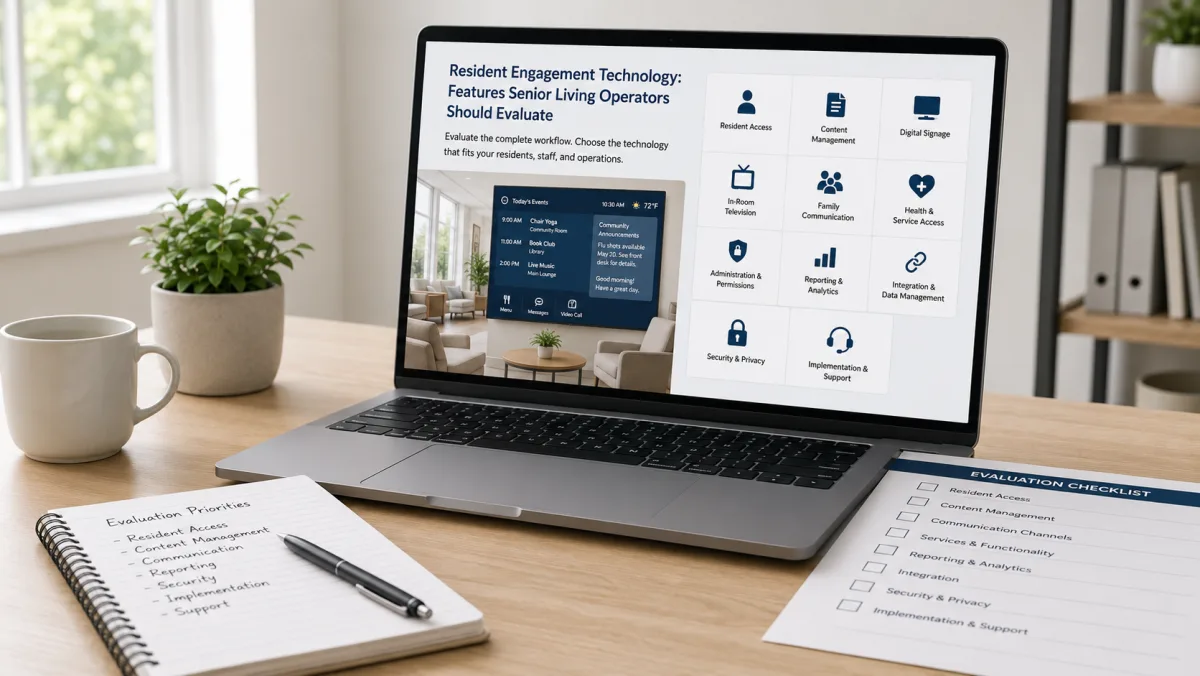
A resident engagement technology evaluation should test how the system works during normal community operations. Feature lists help create a shortlist. Workflow demonstrations reveal whether the product fits the organization.
Senior living CEOs and COOs should organize requirements into resident access, staff administration, enterprise governance, communication channels, services, reporting, security, implementation, and support.
Resident Access
Ask which devices residents can use. Review television, digital signage, tablets, mobile devices, web portals, and printed output.
Test the exact resident experience. Count the number of steps required to find a menu, calendar, message, video call, survey, or service request. Review font size, contrast, captions, audio, navigation, language, timeout settings, and remote-control behavior.
Ask whether experiences can be configured by community, care setting, resident group, or individual. Accessibility needs vary.
Content Management
Staff should be able to create and maintain recurring content without rebuilding the same information for every endpoint.
Evaluate calendars, menus, announcements, alerts, images, video, surveys, directories, transportation information, work orders, and service content that matters to the organization.
Ask how content is approved, scheduled, targeted, corrected, expired, archived, and reused. Review templates and bulk actions. Determine whether corporate teams can distribute approved content while communities add local information.
Digital Signage
Enterprise digital signage requires more than placing a presentation on a screen.
Review screen groups, zones, orientations, playlists, scheduling, emergency overrides, remote device status, content expiration, permissions, and portfolio administration. Ask what happens when a player loses its network connection.
Confirm whether the same content record can appear on digital signs and resident-facing television without duplicate entry.
In-Room Television
A television-based platform can reach residents through a familiar device. Ask how the experience works with existing television service, remotes, channels, set-top equipment, networking, and resident rooms.
Independa publicly identifies organizational services that include digital signage, community calendars, menus, surveys, broadcast messages, work orders, and connection among staff, families, and residents.
Request a demonstration of the real hardware configuration. A browser simulation may not expose remote-control or network issues.
Family Communication
Determine what family members can see and do. Review account creation, consent, identity verification, messaging, video communication, privacy controls, notifications, and access removal.
Clarify whether family communication uses a web portal, mobile application, television connection, email, text messaging, or another channel.
Health and Service Access
Some engagement platforms focus on lifestyle and communication. Others may connect residents with telehealth, remote patient monitoring, health education, reminders, or organization-specific services.
Ask the vendor to separate currently available functions from roadmap items. Request the name and role of every third-party component. Confirm which organization is responsible for clinical workflow, device support, data review, and escalation.
Administration and Permissions
The platform should support enterprise administration and community execution.
Review single sign-on, role-based access, password rules, user provisioning, audit logs, content approval, location hierarchy, and account deactivation. Ask whether the system supports corporate, regional, community, department, and vendor roles.
Reporting
Reporting should answer operational questions.
Can leaders see active communities, active administrators, publishing activity, device status, stale content, resident actions, survey responses, work orders, and support trends? Can data be exported? Are definitions documented?
A dashboard image has limited value when the organization cannot verify how a measure is calculated.
Integration and Data Management
Request an integration inventory. For each integration, document the data exchanged, direction of travel, frequency, matching logic, error handling, ownership, security, support, and additional cost.
Ask whether the platform provides APIs or standard interfaces. Confirm the difference between a production integration, a custom project, and a planned connection.
Security and Privacy
Request security documentation during procurement. Review encryption, hosting, backups, recovery, access controls, logging, vulnerability management, incident response, subcontractors, data retention, and contract terms.
Health-related workflows may introduce additional privacy and compliance requirements. The organization's legal, privacy, security, and clinical teams should review the proposed use.
Implementation and Support
Ask for a written implementation plan. It should identify hardware, network requirements, site surveys, configuration, content migration, training, pilot testing, resident orientation, launch support, acceptance criteria, and escalation.
Review support hours and severity definitions. Confirm who handles television, signage player, remote, network, application, user, and content issues.
A Practical Demonstration Script
Give every vendor the same five scenarios:
- Create an event and publish it to a calendar, in-room television, and a selected digital sign.
- Change the event time and confirm where the update appears.
- Send an urgent message to one building.
- Create a survey and review the response report.
- Deactivate a staff user and show the audit record.
These scenarios make products easier to compare. They also reveal administrative effort.
The strongest choice will fit resident access needs and the organization's operating model. A careful evaluation examines the complete workflow, from content creation to resident action and executive oversight.
Frequently Asked Questions
What features should resident engagement technology include?
Relevant features may include calendars, menus, messages, surveys, digital signage, resident television access, family communication, video, service requests, permissions, reporting, integrations, security controls, and enterprise administration.
Why should vendors demonstrate real workflows?
A workflow demonstration shows the staff effort, approval steps, targeting options, update process, resident experience, and reporting that a feature list cannot show.
What should operators ask about integrations?
Operators should ask which integrations are live, what data is exchanged, how frequently data moves, how errors are handled, who supports the connection, and whether additional fees apply.
How should digital signage be evaluated?
Evaluate screen groups, content zones, scheduling, playlists, emergency overrides, remote device monitoring, offline behavior, permissions, content expiration, and multi-community administration.
What security information should a senior living technology vendor provide?
The vendor should provide documentation covering hosting, encryption, access controls, logging, backups, recovery, vulnerability management, incident response, subcontractors, data retention, and contractual responsibilities.